Agent
01Own the customer interaction
Accept prioritized work, engage across channels, use context and guidance, then complete or continue it.
- 1Accept the right work
- 2Engage with full context
- 3Resolve and complete ACW
Bring prioritized interactions, customer context, cases, knowledge, assistance, and follow-up into one service workspace while keeping human decisions explicit.
Agent Desktop
One focused service workspace
Jordan Lee
Billing case linked
I changed my plan today, but I don’t understand the charge.
I’m reviewing the plan change and the related billing adjustment now.
For 01
CX leaders
For 02
Contact-center operations
For 03
Technology leaders
The agent workspace
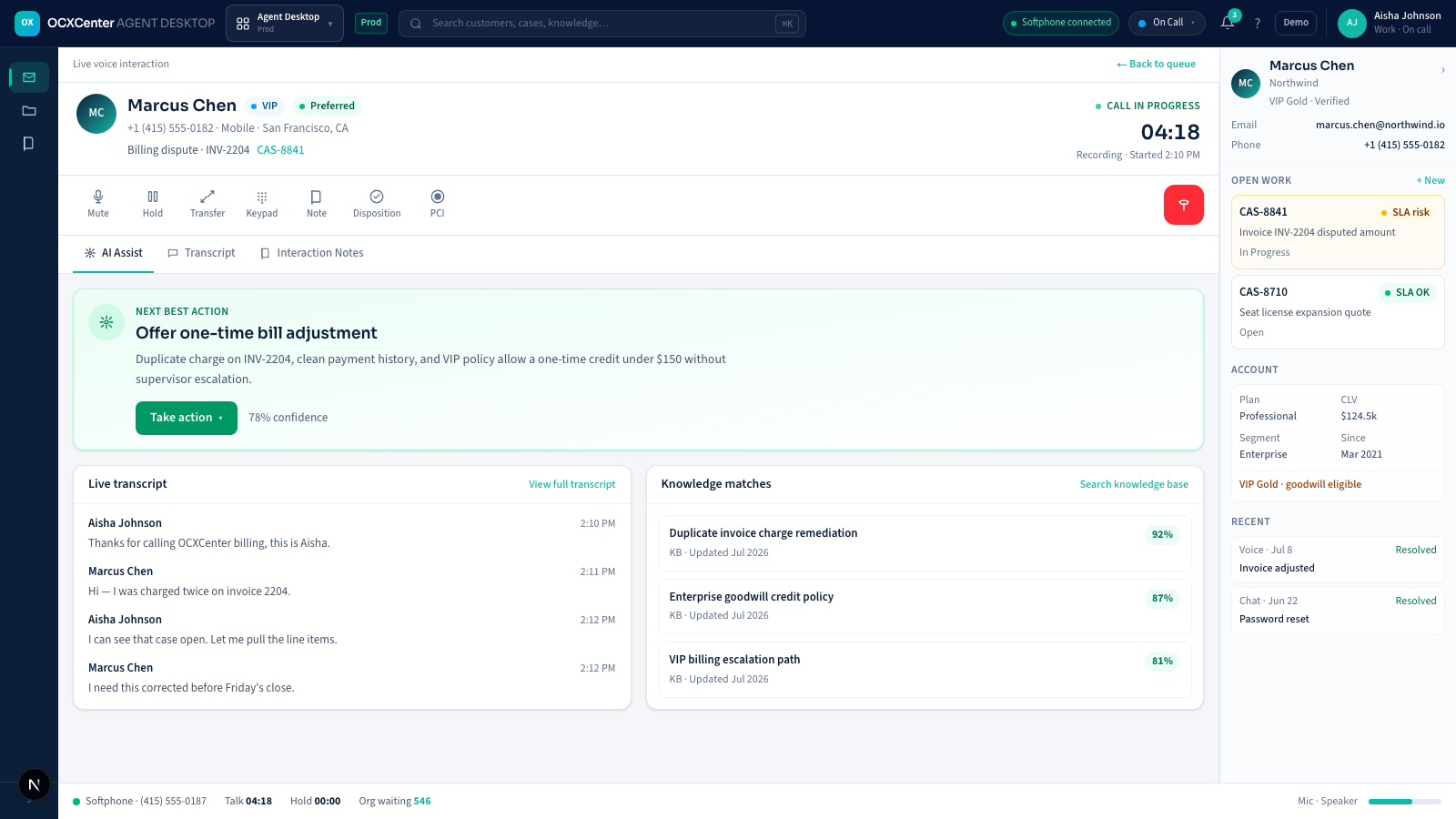
Inspect prioritized work, interaction controls, customer context, guidance, cases, and completion without rebuilding context across tabs.
Live interaction controls, transcript, knowledge, and customer context without tab switching.
Interaction controls
Mute, hold, transfer, keypad, notes, disposition, and PCI controls.
Grounded assistance
Suggested actions remain reviewable and confidence-labeled.
Live transcript
The conversation is available beside the service workflow.
Knowledge matches
Relevant guidance is ranked without obscuring the customer record.
Role-specific work
Agents, supervisors, and administrators use different controls while sharing the same authoritative work state.
Agent
01Accept prioritized work, engage across channels, use context and guidance, then complete or continue it.
Supervisor
02Understand assignment, queue and interaction conditions before coaching or intervening.
Workspace administrator
03Bind queues, profiles, statuses, dispositions, layouts, capabilities, and supporting products.
Workspace anatomy
Core customer work remains available even when an optional provider, Assist, Knowledge, case, or widget dependency degrades.
Make the next authorized item and its ownership state unambiguous.
Prioritize voice, chat, messaging, email, callbacks, tasks, and cases in one routed model.
Coordinate presence, queue eligibility, reservations, capacity, acceptance, expiry, and recovery.
Protect media and ownership-sensitive commands through reconnect and replay.
Keep the interaction, customer record, and authorized actions together.
Handle mute, hold, keypad, transfer, conferencing, composers, attachments, and delivery state.
Present identity, consent, history, open work, SLA state, and related records.
Use Knowledge, Agent Assist, secure forms, co-browse, and supervisor help when enabled.
Preserve the outcome after the live conversation ends.
Capture required dispositions, notes, summaries, fields, and completion evidence.
Move work with retained context or schedule governed continuation.
Publish role- and capability-aware layouts without duplicating authoritative controls.
Interaction lifecycle
Presence, capacity, assignment, interaction, transfer, resolution, and after-contact work remain explicit.
Assignments, queue state, SLA, and customer importance establish the next item.
The agent works with interaction controls, history, knowledge, and assistance in one view.
The outcome and any follow-up become part of the shared service record.
Reduce context reconstruction and make ownership, action, and outcome visible throughout the service journey.
Where it fits
Start with a bounded responsibility, then connect it to shared context, work, policy, knowledge, and evidence.
Bring prioritized voice and digital assignments into one workspace with consistent customer and queue context.
Present knowledge, suggested actions, transcript, and policy cues beside the live interaction for agent review.
Carry dispositions, summaries, cases, tasks, and callbacks into accountable follow-up after the conversation ends.
Enterprise integration and governance
Review integration boundaries and governance controls together so deployment assumptions remain explicit.
Connected product family
Continue the customer journey.
Adoption path
Sequence configuration, integration, testing, and rollout around measurable service outcomes.
Identify channels, queues, roles, customer sources, interaction controls, and systems of record.
Connect authorized data, routing, knowledge, assistance, cases, and outcome requirements.
Exercise live and failure paths with agents, supervisors, security, and service owners before expansion.
Evaluation questions
Evaluate it as one system